
❤Better Efficiency for a Better Experience ❤
Pronto by MTS

Overview
The Pronto app is a bus transportation app that is used by a majority of the UCSD students to get to different locations with ease. However, it has been observed that during peak hours of commuting there is crowding at bus stations as the Pronto app does not efficiently scan the app which causes delays along popular bus routes.
Our designs help to tackle this inefficient method by creating a more streamlined way to scan the app which makes boarding the bus easier. In addition, our designs eliminated the need to have additional apps to check what time the bus will arrive at the station to save the user valuable resources.

As a UX designer, I was the team’s main Figma designer and helped to develop all types of prototypes. In addition, I helped to reiterate prototypes based on feedback that my team and I had received during our user interviews and critique sessions. From March 2022 to June 2022, this 11 week project and its designs were ideated and executed by my team and I.
❤ ❤ ❤
The Problem
We discovered that the QR code used to scan for the bus pass would not properly scan as light reflecting off the phone screen would not bounce back to the sensor. Thus, users would waste valuable time repositioning their phone until the ticket scanned which would range from a few seconds to a near minute and inevitably cause a delay in the bus’s schedule. We tried to solve this issue with inefficiency so that the app allows bus drivers better time management and will indirectly save MTS valuable resources.

Goals
❤ ❤ ❤
Our business goal was not to reinvent the Pronto app, but to revamp it to provide users a more efficient way of scanning the Pronto app while keeping them informed about their bus arrival time. This gives users some peace of mind as they are able to plan ahead which would make them more likely to use the MTS again. In turn, this would make boarding the bus more efficient for the individual and save the MTS valuable resources.

❤ ❤ ❤
Chipping Away With Research
We wanted to get general feedback regarding Pronto, so we got to work surveying 16 individuals and personally interviewing 8 individuals.
.png)
User Interviews:
-
Who did we interview?
-
16 individuals (ages 18-22) who were full-time UCSD students
-
They actively used the MTS bus to commute around the area.
-
A majority relied on the bus as their means of transportation.
-
Only 2 individuals were aware that the Pronto app had an in-app trip planner
-
3 to 4 individuals used a third party bus tracker to accurately see where their bus is located
-
-
We asked questions about:
-
What times they took the MTS bus
-
Why they didn’t use other forms of transportation
-
Which bus station they frequented
-
How they felt about the Pronto app in general
-
❤ ❤ ❤
❤
❤
❤ ❤ ❤
❤

Key Insights:
-
Students don’t mind crowding at the front of buses and care more about how they board the bus.
-
It is more intuitive to keep the user more informed than to send out more buses on a particular bus route.
-
Providing accurate arrival times and bus locations improves the likelihood of more users using public transportation when commuting.
❤ ❤ ❤
❤ ❤ ❤
Information Architecture
Playing with Concepts

Pronto User Flow

❤ ❤ ❤
Three different features → One big solution
There were multiple angles we tried to approach the problem as we discussed overlapping issues with the Pronto app. These issues encompassed multiple parts of the bus system from the Pronto app to the actual bus station itself. However, we wanted to help users directly by focusing more on the Pronto app instead of issues that may be out of their control. Thus, we focused on three main design ideas: scanning efficiency, accurate arrival times, and integrated bus notifications.
_____________________________________________________________
❤ ❤ ❤
________________________________________________________________
1) Improved Scanning Method→ Increased Efficiency
Inefficiency in the Pronto app was mostly caused by the QR code not being scanned by the ticketing booth. Users had to constantly reposition their phones to properly scan their ticket which would cause a line to build up. At first, we tried to ideate a reservation system where the user would reserve a spot on the bus and would show a green checkmark as they boarded the bus. If one reserved for a bus that was already full then they would be notified that it was full and not allowed on.

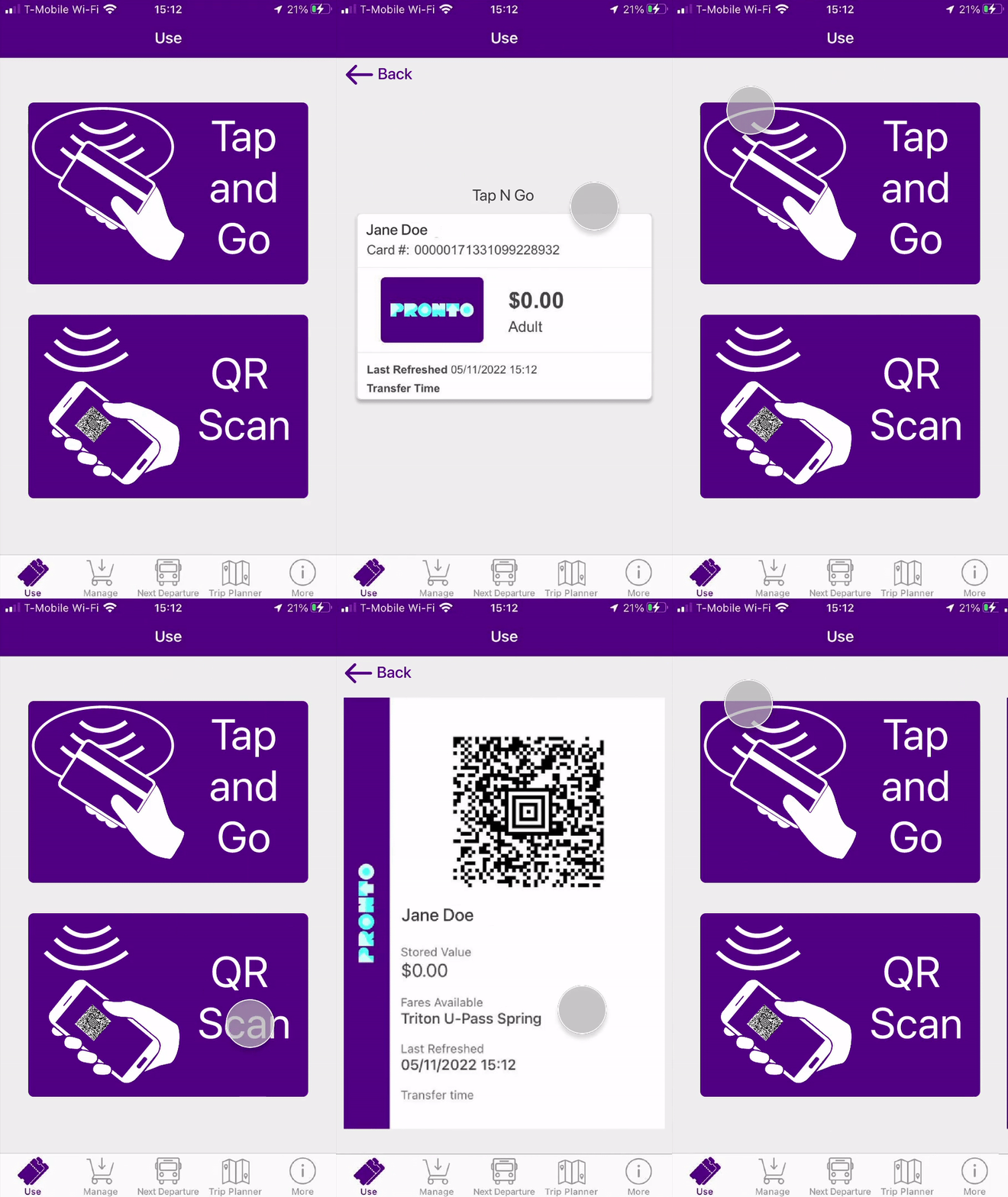
We decided to implement a feature that would be the most flexible fix to the problem and that was implementing a Tap and Go feature similar to that of Apple pay. This meant that the individual could just open the app and tap their phone onto the console that was located at the front of the bus to scan their ticket. The user didn’t need wifi to access their ticket as it was directly on their app.
_____________________________________________________________
❤ ❤ ❤
________________________________________________________________
2) Accurate Arrival Times → Greater Preparation
We did not want to reinvent the Pronto app, so to reduce extra work making an extra tab the “Next Departure'' tab was revamped. Initial search results would only give users the fastest arriving bus for their specified location, but sometimes the fastest arriving bus doesn’t necessarily mean the closest bus. Expansion on the results was done by adding a filter so users had the option of viewing either the fastest arriving bus or the closest bus. Users were taken to a live map that would show how far the bus was away from their stop and would give users a rough time estimate.

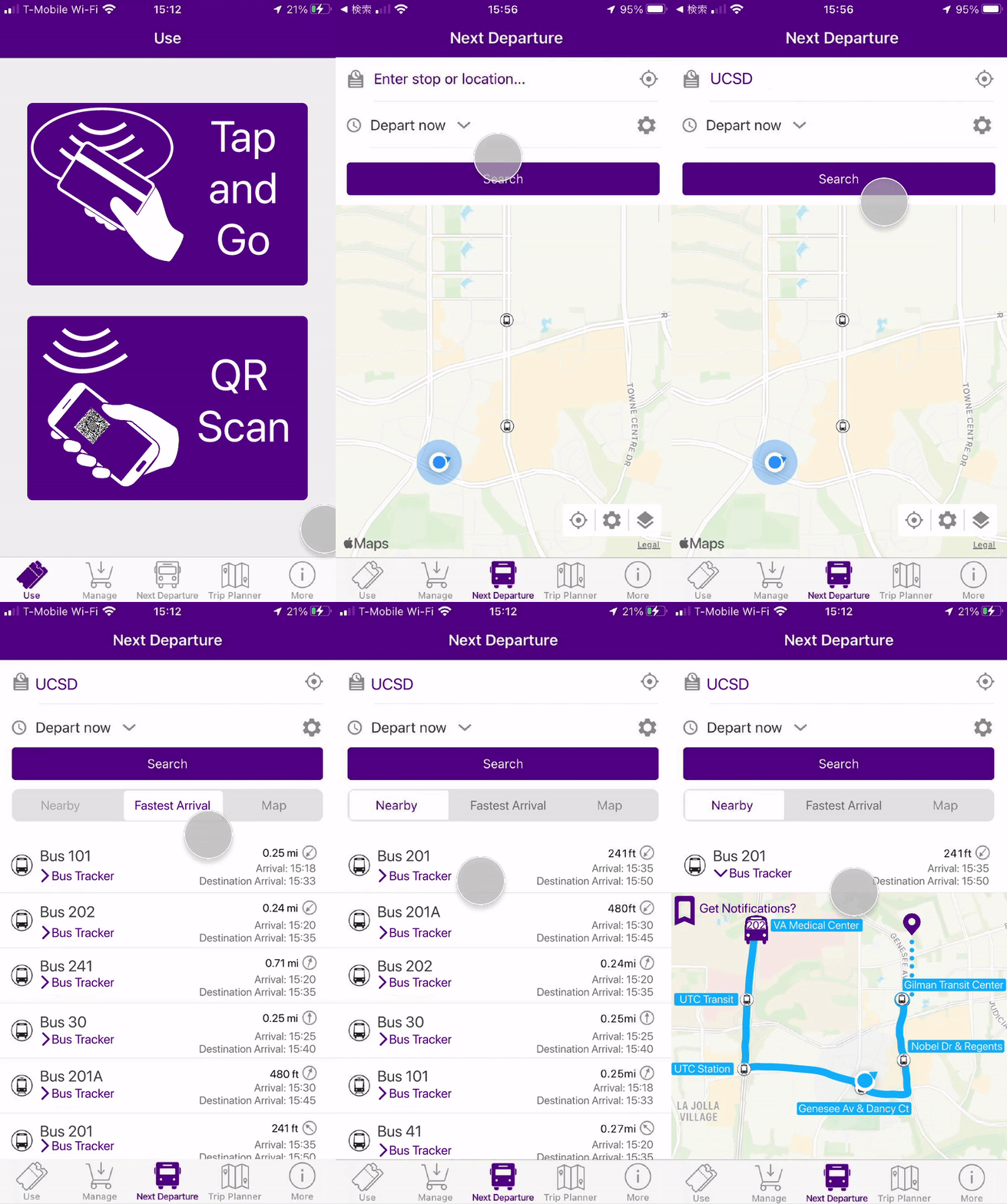
We decided that it made sense to include the live map tracker with the “Next Departure” tab as having to open a separate app just to locate the bus was unnecessary work for the user. We thought it would be more intuitive to include a live tracker in tandem with the bus info that the user looks for. All the bus information would seamlessly be located all in one spot for the user.
_____________________________________________________________
❤ ❤ ❤
_____________________________________________________________
3) Additional Bus Notifications→ More Content Users
As phone users ourselves, we realized that users would like to be on their phone doing other tasks rather than sitting down and constantly staring at the live map for updates. So, we designed a feature that allowed users to turn on notifications to inform them of how many stops the bus is from them.

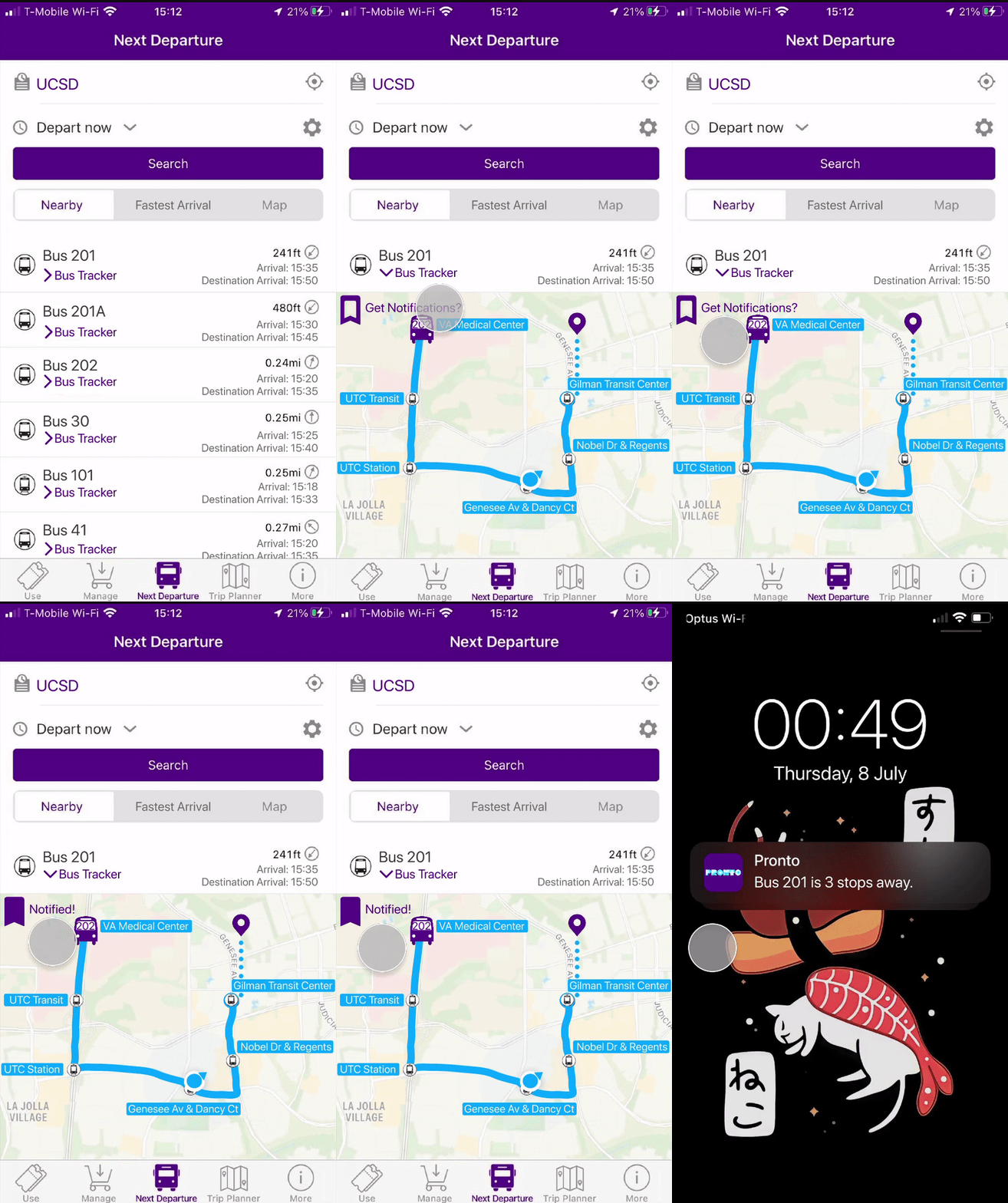
This feature in tandem with the live tracking feature would make waiting for the bus less stressful and more efficient by preventing users from crowding at the wrong bus. This would help save users phone storage and time as third party tracking apps would no longer need to be downloaded or used separately from the Pronto app.
❤ ❤ ❤
Final Results
Although we didn’t personally see our design being implemented straightaway and its impact, we understood that if these solutions were to be implemented then line build up would be reduced significantly. It was noted that an instant tap was faster than scanning by up to about 35 seconds per person and would mean an approximate 15 to 20 percent increase in efficiency for the MTS.

Overall, it was observed that our implemented design features would save the MTS resources by reducing bus delays and making public transportation more reliable which would increase the likelihood of gaining new MTS customers.
❤ ❤ ❤